The way I fixed this issue was to disable the file browser pane plugin from Edit -> Preferences -> Plugins. Once I disabled the file browser pane plugin I was able to get gedit to startup faster, immediately even.
Showing posts with label text editors. Show all posts
Showing posts with label text editors. Show all posts
Saturday, February 6, 2010
gedit Loads Slow
The way I fixed this issue was to disable the file browser pane plugin from Edit -> Preferences -> Plugins. Once I disabled the file browser pane plugin I was able to get gedit to startup faster, immediately even.
Sunday, April 13, 2008
gedit External Tools indent-- & indent++
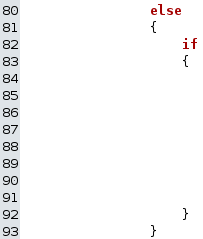 There's times when I have to remove an outter conditional block from a script & in order to keep everything orderly this means I also need to decrease the indent in the code within that conditional block by one.
To the right is an example of this situation. I want to remove the else outter conditional since the inner code needs to be evaluated whether the preceeding code succeeds or not.
Normally in something like Notepad this would mean alot of fancy finger work on the down arrow and the delete key on my keyboard.
In Notepad2 I was able to utilize the find & replace support for Regular Expressions and remove the tabs from the beginning of each line in the selection.
Now that I have gedit as my primary editor since I'm on Ubuntu I don't have acces to Notepad2, however I do have access to the External Tools plugin for gedit.
Through the external tools plugin I can filter selected text through sed, which is basically a RegEx filter designed to be used with pipes.
So I setup two new commands through that plugin, one for decreasing the indent by one which I call indent-- and another which I use to do the exact oppisite which I call indent++
If you're new to gedit like I am, first you'll need to enable the Enternal Tools plugin.
You do this by going through
Edit -> Preferences -> Plugins Tab -> Check "External Tools"
This will enable the following menu option where you can manage commands to filter selected text and documents through.
Tools -> External Tools
The dialog for managing tools is pretty self explainitory, here's what I entered for the command to be used for my indent-- tool.
#!/bin/sh

sed 's/^\t//g'
Here's the command I'm using for my indent++ tool.
#!/bin/sh

sed 's/^/\t/g'
I actually got the idea after seeing the existing command to remove whitespace from the end of lines.
Thursday, December 6, 2007
BOM Squad
Since posting about phpBB3 and UTF-8 BOM/Signature in October, I discovered there seems to be alot of people tripping over UTF-8 encoded files that have a BOM, otherwise known as a Signature embeded.
Most people seem to know what the BOM is and what it does, but don't know how to get rid of it or how it got there.
Well, now seems like a good time to go over how the BOM gets in files, how to find out if an editor is silently prepending a BOM to UTF-8 encoded files, and how it can be removed if needed.
A major source of these BOM headaches seems to be Notepad on Windows. When saving a file with UTF-8 encoding using Notepad on Windows, it automaticly prepends the BOM to the file but doesn't inform the user about this.
I think this is partly due to quite a few people suggesting that Notepad can be used to easily and quickly convert files to UTF-8 in order to solve issues with strange characters showing up in files.

Here's a screenshot of the choices you get when saving a file using Notepad. You can see there's no mention of BOM, or Signature there.
I can't help but wonder why Microsoft decided to diferentiate between big & little endian for Unicode but not leave a choice for the UTF-8 BOM.
From what I understand Windows text editors are the main contributers of UTF-8 BOM in files. UNIX type system applications generally don't include the BOM because it can cause problems with configuration files, which are primarily text files.
The first thing to do is check your editors' settings, particularly areas having to do with encoding, very well for UTF-8, BOM, and or Signature. You may have controll over what your editor does and it's good to be aware if you do.
One method to determine if your editor is secretly prepending the BOM to your files is to save an empty file using UTF-8 encoding and look at the filesize. If what should be an empty file has a filesize of three(3), your editor is prepending a BOM. You might want to consider leaving a single character in the file & making sure it's not four(4) bytes instead, some editors may default to non-UTF encoding for empty files.
I use a Notepad replacement called Notepad2 for quick editing. That application gives me an option to save UTF-8 encoded files with or without the BOM, though it calls it a Signature. Notepad2 displays which encoding is used in the file on the applications status bar which comes in handy from time to time. The application is self-contained and compressed is only about 250KB, easily carried around on a USB memory stick.
Another option for getting rid of the BOM is using the Perl script in this forum thread. I tried it myself (as seen in that thread), it works exactly as expected. This is probably the one of the easiest options if the files are on a Ubuntu or Linux system.
I'm sure there's plenty of people looking for a PHP solution to removing the BOM, so here's function designed for that situation called debom_utf8. It should work in either PHP4, PHP5. The methods used are generic enough that it should continue to work in PHP6.
<?php
 /*
  @author:   http://develobert.blogspot.com/
  @description :  PHP Function to remove UTF-8 BOM/Signature from the beginning of a file.
  @param $filename: Name of the file a BOM should be looked for and removed from.
  @returns (bool): Returns true if the file didn't, or no longer contain(s) a BOM, false on error.

  @example usage:  echo debom_utf8('BOM.txt') ? 'free of BOM' : 'error';
 */
 function debom_utf8($filename = '')
 {
  if($size = filesize($filename) && $size < 3)
  {// BOM not possible
   return true;
  }
  if($fh = fopen($filename, 'r+b'))
  {
   if(bin2hex(fread($fh, 3)) == 'efbbbf')
   {
    if($size == 3 && ftruncate($fh, 0))
    {// Empty other than BOM
     fclose($fh);
     return true;
    }
    else if($buffer = fread($fh, $size))
    {// Shift file contents to beginning of file
     if(ftruncate($fh, strlen($buffer)) && rewind($fh))
     {
      if(fwrite($fh, $buffer))
      {
       fclose($fh);
       return true;
      }
     }
    }
   }
   else
   {// No BOM found
    fclose($fh);
    return true;
   }
  }
  return false;
 }
?>
Comments on other methods to deal with BOM disposal are more than welcome.
Sunday, October 14, 2007
phpBB3 & UTF-8 BOM/Signature
When phpBB.com says language files need to be saved as UTF-8 with no BOM, they have a good reason. This also goes for other PHP files as well.
Apparently PHP has a bug which causes it to treat the BOM marker in a UTF-8 encoded PHP file as data which should be sent immediately, instead of throwing it away.
This prevents PHP from sending headers via the header() method, I'm guessing it can cause some havok with cookies as well.
A tell tale sign of this is PHP error messages that look similar to the following.
With phpBB3, the error message will look somthing like this
[phpBB Debug] PHP Notice: in file /includes/functions.php on line 3372: Cannot modify header information - headers already sent by (output started at /geoip_install.php:1)
PHP files in general will have a similar error message with slightly different wording, note the character position pointer at the end of the filename being "1".
Warning: Cannot modify header information - headers already sent by (output started at /var/www-partition/phpBB3/geoip_install.php:1) in /var/www-partition/phpBB3/includes/functions.php on line 3368
Now, in case your editor causes you to become confused because of the wording in the encoding options being somthing along the lines of Unicode BOM and UTF-8 Signature, it is UTF-8 Signature that should be considered UTF-8 BOM.
I'm not sure how many editors call it a Signature instead of a BOM, I know Notepad2 does though.
Subscribe to:
Posts (Atom)